Triochat Features
Update Contact Field and Tag
Copy page
Update Contact Field
What Is the Update Contact Field Feature?
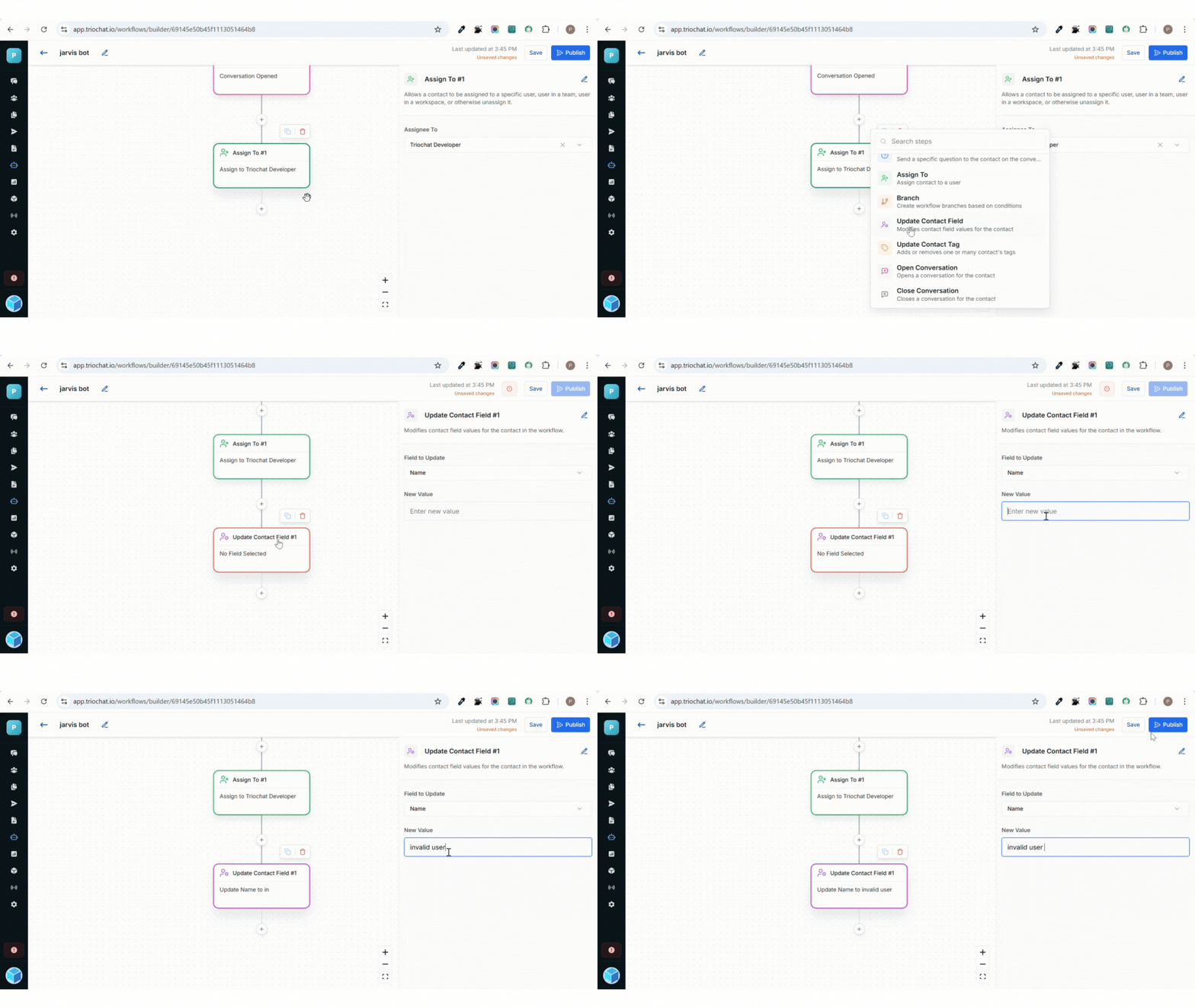
The Update Contact Field feature in triochat.io allows you to automatically modify or update specific details of a contact during an active workflow.
It ensures that your contact database stays accurate and up-to-date by changing field values based on user responses or chatbot logic.
For example, when a user shares their email or phone number during a chat, triochat.io can instantly update the corresponding contact field.
This removes the need for manual updates and keeps your CRM data accurate in real time.
Configuration of Update Contact Field
Setting up the Update Contact Field feature in triochat.io is simple and involves two main configuration steps:
1. Field to Be Updated
Choose which contact field you want to update from the available options:
- Name – Update or correct the contact’s name.
- Phone – Modify or add a new phone number.
- Email – Add or replace the existing email ID.
- Company – Include or change the contact’s company name.
- Country – Store or update the contact’s country.
- Custom – Update any custom field you’ve created, such as Membership Type, Preferred Product, etc.
Each field can be automatically updated based on user responses or system data.
2. New Value
After selecting the field to update, enter the value that will replace or modify the existing data.
The new value can be:
- A static value – Manually entered text like "India" or "Gold Member".
- A dynamic value – Automatically fetched from a previous chatbot response or workflow variable.
This gives you flexibility to personalize updates based on real-time user input.
How It Works
When the workflow reaches the Update Contact Field step, triochat.io automatically checks which contact field you selected and replaces its value with the new one provided.
- If the contact already has an existing value, it will be overwritten with the new value.
- If the field is empty, the new data will be added directly.
This entire update runs silently in the background without interrupting the user’s chat experience. It ensures that every contact record stays complete, accurate, and ready for future automation, segmentation, or marketing activities.
Suggested Use Cases
Here are a few practical examples of how this feature can be used effectively:
Lead Qualification
Automatically update a contact’s Company or Industry field when they answer related questions in the chat.
Profile Completion
When users share missing details like email or phone numbers, update the contact record instantly.
Segmentation for Campaigns
Tag contacts with country or membership status (e.g., “India,” “Premium User”) to send targeted messages later.
Customer Support Follow-Up
Update ticket-related fields like Issue Type or Status to keep support workflows organized.
Update Contact Tag
What Is the Update Contact Tag Feature?
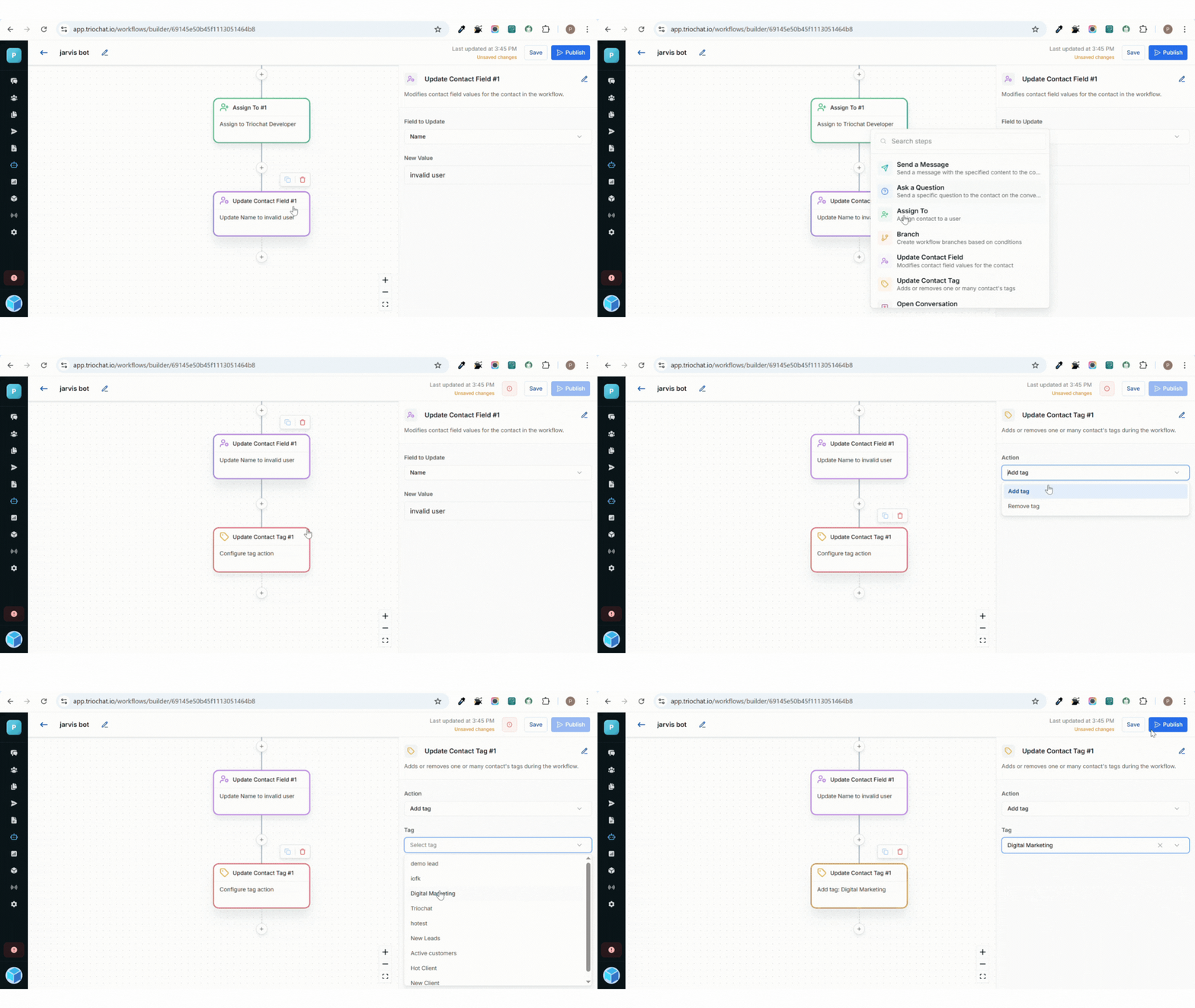
The Update Contact Tag feature in triochat.io allows you to add or remove tags from contacts automatically while a workflow is running.
Tags help you organize contacts based on behavior, interest, or status. Instead of manually sorting contacts, you can let your chatbot update tags in real time, keeping your audience segmented and ready for personalized follow-ups or campaigns.
For example, when a user completes a purchase, you can automatically add a tag like "Customer" and remove a tag like "Lead".
Configuration of Update Contact Tag
Setting up this feature in triochat.io involves two simple steps:
1. Action
Choose what you want the workflow to do with the tag:
- Add Tag – Adds one or multiple tags to a contact during the chat flow.
- Remove Tag – Removes one or multiple tags from a contact if they no longer apply.
This helps maintain a clean, updated contact list that reflects each user’s most recent activity or stage.
2. Tag Selection
After choosing the action, select the tag you want to add or remove.
You can pick from existing tags or create new ones that match your workflow purpose—for example:
- New Lead
- Interested
- Follow-up Needed
- VIP
How It Works
When a workflow reaches the Update Contact Tag step, triochat.io executes the selected action:
- If Add Tag is chosen, the system instantly attaches the specified tag(s) to the contact’s profile.
- If Remove Tag is chosen, those tag(s) are removed from the contact record.
These updates happen automatically, keeping your CRM or contact list accurate without manual work. The process runs silently in the background and does not interrupt the user’s chat experience.
Suggested Use Cases
Here are a few practical scenarios where the Update Contact Tag feature can make workflows smarter and more efficient:
1. Lead Management
- Add the "New Lead" tag when a visitor starts chatting.
- Remove it automatically once they are qualified.
2. Customer Segmentation
- Tag users as "Interested in Product A" or "Interested in Product B" based on their responses.
3. Campaign Targeting
- Add tags like "Sale2025" for users who interact with a promotional campaign, making it easier to retarget them later.
4. Support Ticket Tracking
- Use tags such as "Issue Open" or "Issue Resolved" to track and manage customer support progress.
In Summary
The Update Contact Tag feature helps keep your contact management organized and dynamic.
It ensures your chatbot automatically adjusts tags as users move through different stages, improving segmentation, automation, and follow-up accuracy — all without any manual effort.
Was this page helpful?
On this page